Your policy decides
what the AI sees.

Governance, not security. Judgment, not detection. Before anything reaches a cloud AI, Covenant checks it on your own machine — against the policy you wrote.

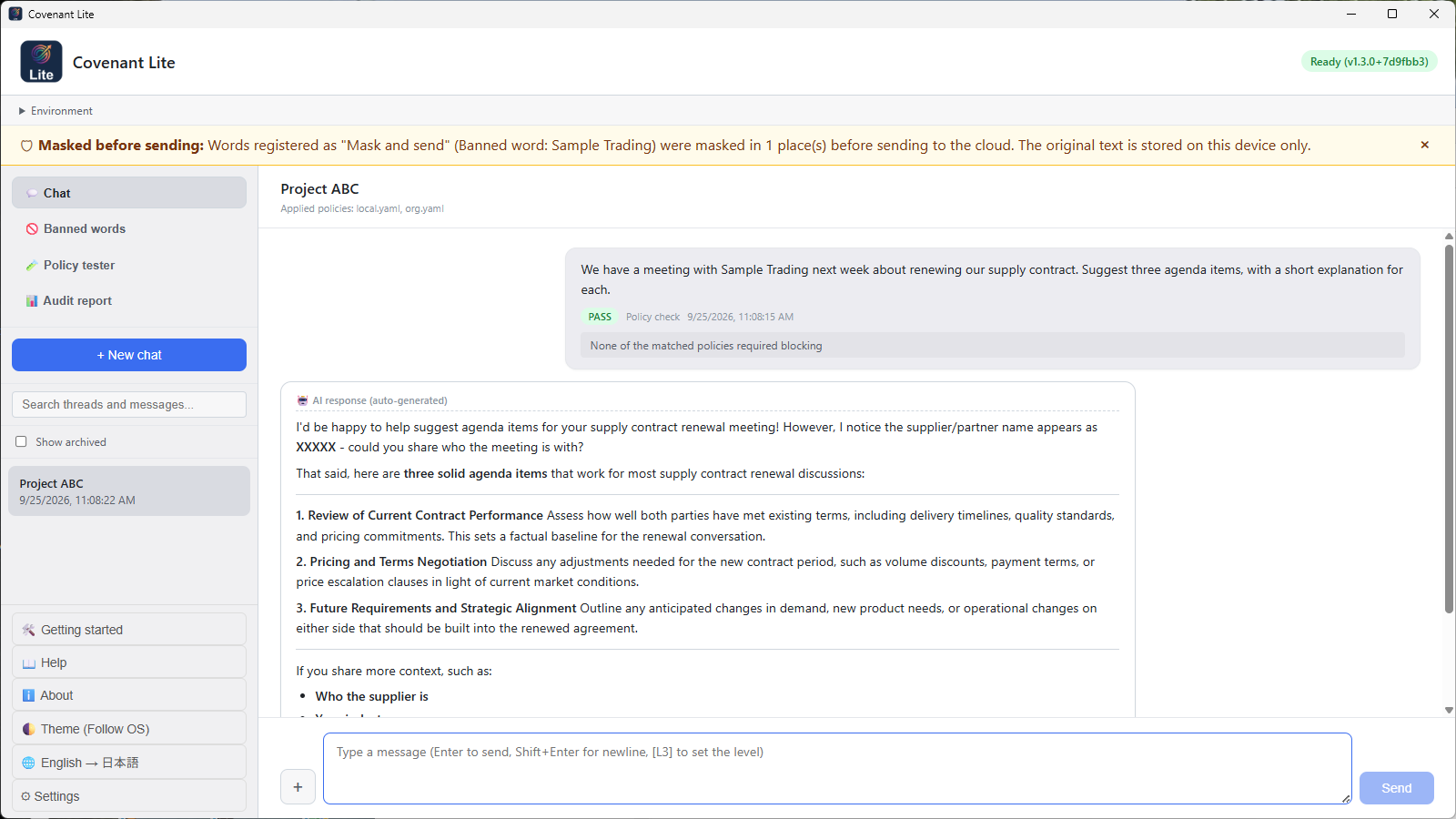
Covenant Lite: the banner at the top says a registered term was masked before the message was sent to the cloud AI
Covenant Lite (Windows). A registered term was masked before the message went out.
Covenant Lite Checks exactly what you wrote. No local AI required — start on the computer you have. One-time purchase. More Covenant Personal Edition A local AI evaluates sensitivity; your policy decides where it goes. Images are checked too. Monthly subscription. More Covenant Bridge The same policies for AI chat in your browser. For Chrome and Edge. Free. More News Covenant Lite, a one-time-purchase entry edition, and the Covenant Bridge browser extension Read

Two editions of Covenant

Both check what you are about to send on your own machine, before it reaches a cloud AI. They differ in what they look at.

Covenant Lite

AI governance for individuals — fast and literal. Personal information, API keys and the terms you define, checked on your PC before you send.

  • Detects personal information (phone numbers, email addresses, credit card numbers and more) and API keys before you send
  • You choose what happens on detection: block, mask before sending, or process with a local AI
  • Register your own terms (client names, project names, internal code names) as "banned words"; each is checked the same way
  • A local AI is not required. Start on the computer you already have

One-time purchaseJPY 500 in Japan; other storefronts show the price in your local currency

Download on the Mac App Store Get it from Microsoft

License agreement (Lite)

Covenant Personal Edition

AI governance and LLM routing for individuals. Evaluate before you send, route by your own policy, keep the record.

  • Evaluate before sending: a local AI evaluates your input, and your policy decides where it goes (AI evaluates, policy judges, the human decides)
  • When your policy marks something highly sensitive, it is not sent automatically — it stops and waits for you to approve
  • Grow your policy: you set, and grow, what counts as sensitive and where it may go
  • A record that is yours: sends to the cloud are logged on your own machine
  • Images are checked too: text in screenshots and photos is read by a vision model and checked before you send (requires a vision model in Ollama)

Monthly subscriptionFree to install. JPY 5,000 in Japan, USD 29.99 in the United States; other storefronts show the equivalent in your local currency

Download on the Mac App Store Get it from Microsoft

Requires a local AI runtime (such as Ollama or LM Studio) — see requirements / License agreement (Personal)

Covenant Bridge — the same policies in your browser

An extension for Chrome and Edge. What you send to claude.ai, chatgpt.com, and gemini.google.com is checked against the same policies before it is sent. The check is done by Covenant on your own computer; the text is not sent outside your computer for the check. It works with both Covenant Lite and Covenant Personal Edition. Free. After adding the extension, reload any AI chat tabs (claude.ai, chatgpt.com, gemini.google.com) that are already open. Tabs that were open before you added it are not checked.

View in the Chrome Web Store / View in Microsoft Edge Add-ons

Covenant Lite and Covenant Personal Edition, side by side

Covenant LiteCovenant Personal Edition
What it checksThe policies you write (including banned words), personal information, and API keys, checked exactly as writtenThe policies you write, personal information, and API keys, plus a context evaluation by the local AI (it also catches confidential content you did not write down; the evaluation is probabilistic and, by default, its result is a warning)
On detectionBlock / mask and send / process with the local AI (when a local AI is set up). Chosen in settings for personal information and API keys; per word for banned words: stop or maskBlock / mask and send / process with the local AI (when a local AI is set up). Chosen in settings for personal information and API keys; in policies you write whether to stop or mask. You can also route to a destination by policy (LLM routing, when configured)
PolicyBanned words (registered on screen) + policy files in 2 layers (organization, personal)Policy files in 3 layers (organization, project, personal; you can write per-project policies) + creating policies from plain text (Policy Translator)
AttachmentsThe content of documents and text files (PDF, Word, Excel, text, source code, etc.) is checked too. Images cannot be attachedDocuments and text files, plus text appearing in images, which is read and checked (requires a vision model)
Local AINot required (optionally usable as a destination after the check)Required (used for the evaluation). Recommended environments are published
The number the audit report leads withThe count of inputs sent without matching any policyThe count of cloud sends at confidentiality level L3 or above (if it is 0, it records that, following your policies, none were sent)
Browser (Covenant Bridge)Supported (checked by policies, personal information, and API keys)Supported (browser checks use policies, personal information, and API keys; the AI evaluation applies to input in the app's chat)
Carry-overConversations and policies are carried over automatically the first time you start Covenant PersonalCan receive a carry-over from Covenant Lite
PriceOne-time purchaseMonthly subscription
Who it suitsPeople who know which words they want to protect and want to start today on their current PCPeople who want the context of their contracts considered, and a local record of decisions made before sending

News

All news

A normal request goes through and is answered locally → an input containing an unreleased product name stops for your decision → the same is checked in batch, and the audit report shows where everything went.
Every name and number in the demo is fictional. Waiting time is fast-forwarded, as marked on screen; response time varies with your environment.

People whose work is bound by confidentiality

Freelancers and sole proprietors working under NDAs. Lawyers, accountants and other professionals whose duty of confidentiality is imposed by law rather than by contract. Anyone who wants the record of their AI use to stay on their own machine.

For these readers the question is rarely "is AI useful". It is "what may I put into it" — and that question is usually answered by memory and attention, on a busy day, one prompt at a time. Covenant moves the answer out of your attention and into a rule you wrote once.

AI evaluates. Policy judges. You decide.

This and the next section describe Covenant Personal Edition. Covenant Lite does not use AI to evaluate; it checks what you wrote, literally.

1

Evaluated before it is sent

A local AI on your own machine assesses how sensitive the input is. The evaluation itself never leaves your device.

2

Your policy decides the destination

You define what counts as sensitive and where it may go. Sensitivity levels run from L1 (public) to L4 (top secret), and you decide what each one means.

3

The record stays with you

What was sent, when, and why it was judged that way — logged on your machine. You can produce an audit report yourself, without asking us.

Nothing is hard-wired

Covenant ships talking only to a local AI on your own machine. No cloud provider is configured. Cloud AI opens only after you do two things yourself: register your own API key, and change the destination. Neither one alone opens it.

Once cloud is open, ordinary input goes there without ceremony. When your policy marks something highly sensitive, Covenant does not send it automatically — it stops and waits for you to approve. Continuing with the local AI instead of stopping is a routing rule you write in your policy.

There is no hidden block list. What stops and what flows is what your policy says. That is the point: the control is yours, and it is inspectable.

What you get, and what you do not

We would rather you decide not to buy than be disappointed after you did. So here is the scope, plainly.

What you need before you start

Covenant Lite needs Windows 11 (x64), or macOS 13 (Ventura) or later on Apple silicon, and your own API key to use cloud AI. A local AI is not required.

Covenant Personal Edition needs:

Recommended environments (in Japanese)

Where this does not help

Two editions, on the Mac App Store and the Microsoft Store

Covenant Lite is a one-time purchase. Covenant Personal Edition is free to install and requires an in-app monthly subscription — JPY 5,000 in Japan, USD 29.99 in the United States; other storefronts show the equivalent in your local currency.

Covenant Lite / Covenant Personal Edition / Compare the two

Questions before you buy? Write to contact-us@exapolicy.co.jp — we answer in English.